How it works
How the parts fit together
Arena360 is a few simple parts that connect in one way. Read this once before you set up, and every screen in the admin panel will make sense.
From ₹499 a month, plus GST
Free for 14 days. A card or UPI is needed to start. Cancel before day 15 and pay nothing.
- Cafe
- Branch
- Station type
- Station class
- Station
01
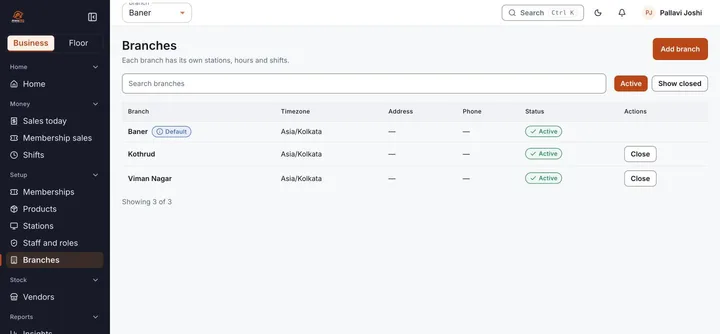
Your cafe and its branches
- What it is
- Your cafe is your account. Each place you run is a branch, with its own address, floor, staff, stock and money.
- What it is for
- A branch keeps one place apart from the next, so a shift, a drawer or a stock count is always for one place.
- What it connects to
- Everything below belongs to a branch. The Owner sees every branch with one login.
02
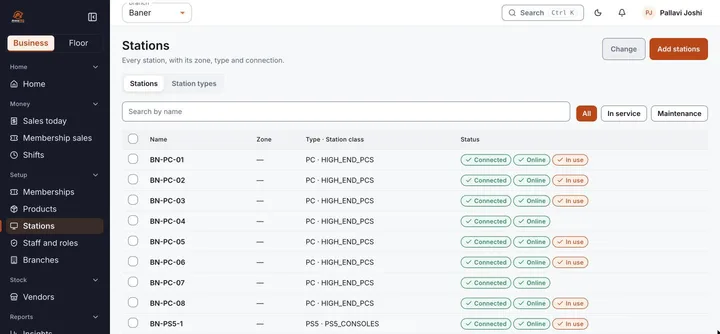
Stations
- What it is
- A station is one place a player plays: a PC, a console, a turf or a pool table.
- What it is for
- Time is sold and counted per station, so every minute played belongs to one of them.
- What it connects to
- Each station sits on the floor board of its branch and has one station type and one class.
03
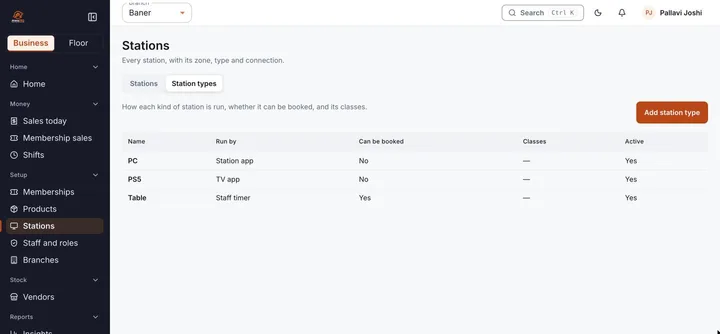
Station types
- What it is
- A station type says what kind of station it is and how it is run: PCs run by the station app, consoles run by the TV app, or tables run by staff, such as turf or pool.
- What it is for
- The type decides which app the station needs and how play ends at time-up: a PC locks, a TV switches back, and staff end a table from the floor board.
- What it connects to
- Every station has one type. Memberships and bookings are made for a type.
04
Station classes
- What it is
- A class splits one type into groups that are priced apart, such as high-end and mid-range PCs.
- What it is for
- Stations of one type are not always worth the same. A class lets each group have its own memberships and prices.
- What it connects to
- A membership is for one type and one class, and plays on every station in it.
05
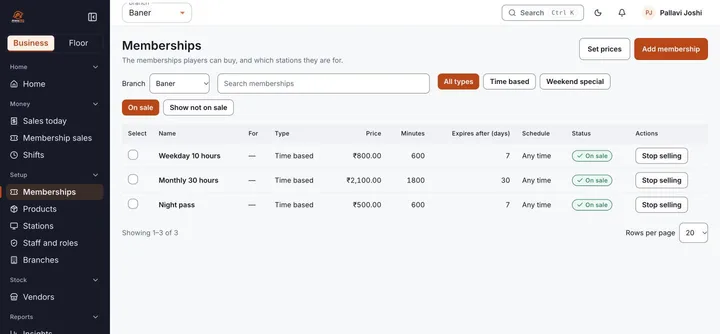
Memberships
- What it is
- A membership is what a player buys: a number of minutes, for a type and class, valid for a number of days.
- What it is for
- Selling time as memberships means a player pays first and plays down what they bought.
- What it connects to
- A player holds the time of each membership they bought, and sessions use it up.
06
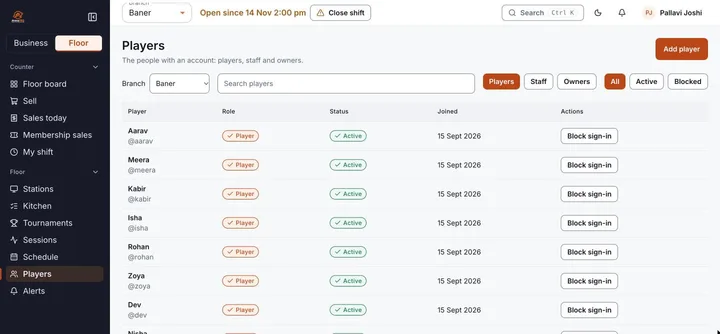
Players and their time
- What it is
- A player is a person who plays at your cafe. Each player holds the minutes left on the memberships they bought.
- What it is for
- Time held by a named player can be checked on any screen, so nobody argues about what is left.
- What it connects to
- A session takes minutes from the player's time on the station they sit at.
07
Sessions
- What it is
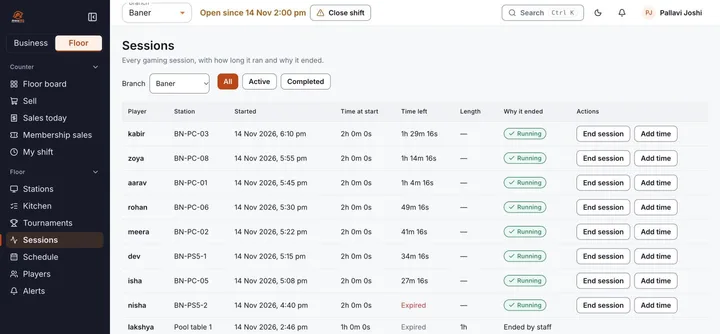
- A session is one player playing on one station, from its start to its end.
- What it is for
- Every minute played is a session, so every minute is either paid for or on record.
- What it connects to
- A session runs on a station, uses a player's time and ends at time-up or when staff end it.
08
Shifts and cash drawers
- What it is
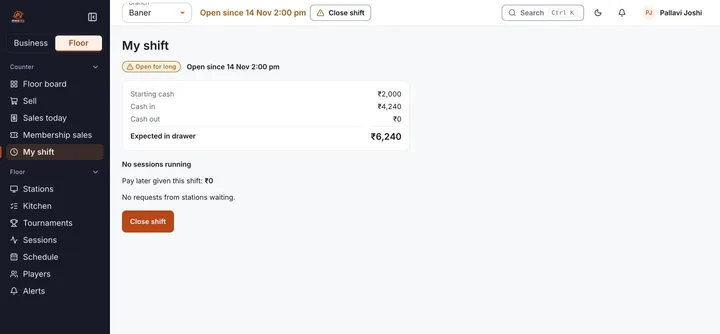
- A shift is one person's time at the counter, with its own cash drawer.
- What it is for
- Each sale belongs to a shift, so at the end the drawer is counted against what was sold in it.
- What it connects to
- Sales and memberships sold go into the open shift; closing it checks the drawer.
09
The apps
- What it is
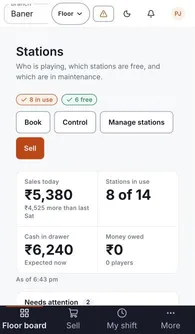
- Arena360 has four apps: the admin panel at the counter, the station app on each PC, the TV app beside each console, and the admin app on the Owner's phone.
- What it is for
- Each app does one job where it is needed, and they all read the same cafe.
- What it connects to
- The admin panel runs the counter, the station and TV apps end play at time-up, and the phone gets the alerts.
Why stations are grouped into types and classes
- One membership plays on every station of its type and class, so you sell one membership for ten PCs, not ten.
- A class lets stations of one type have different prices, such as high-end and mid-range PCs.
- Reports and busy-hour prices follow the same groups, so you see what each group earns and price its busy hours.
- Tables run by staff are a type of their own and need no app.
An example cafe with 10 high-end PCs, 10 mid-range PCs and 4 PS5s sets up two types and three classes. Each class gets its own one-hour membership, at the prices the Owner chooses:
| Stations | Type | Run by | Class | One hour |
|---|---|---|---|---|
| 10 | PC | Station app | High-end | ₹120 |
| 10 | PC | Station app | Mid-range | ₹80 |
| 4 | PS5 | TV app | Standard | ₹150 |
A player who buys the high-end hour can play it on any of the ten high-end PCs, but not on a mid-range PC or a PS5: a membership plays only on the type and class it was made for. The prices are an example; you set your own.
Which device runs what
Windows PC
The station app
Internet at the PC, paired with its station by a code
The installation guideConsole with an Android TV, such as a PS5
The TV app on the TV next to it
The console plugs into the TV by HDMI, with HDMI-CEC turned on
The installation guideTurf, pool table or a console without the TV app
No app: staff run it from the floor board
Nothing to connect
The help articleCounter computer
The admin panel in a browser
Internet, signed in as the person on the shift
The help articleOwner's phone
The admin app
Internet, with notifications on
The installation guide
What to set up first
The setup wizard asks for these six things in this order. Each step needs the one before it.
1. Your cafe
Your cafe's details come first, because everything else belongs to the cafe and its branch.
2. Add your stations
Stations, with their types and classes, are what memberships are made for.
3. Create memberships
Memberships set what a player pays to play on each type and class.
4. Add products
Snacks and drinks to sell at the counter. You can skip this step and add them later.
5. Invite staff
Each person gets a role before they sell. You can skip this step if you run the counter alone.
6. Ways to pay
Cash and UPI come last, so the first sale can be taken.
Try it in your own game zone, free for 14 days.
From ₹499 a month, plus GST
Free for 14 days. A card or UPI is needed to start. Cancel before day 15 and pay nothing.