Sell memberships at the counter
Sell packs of hours and passes for each kind of station. The time runs down as the player plays, on any station it is for.
From ₹499 a month, plus GST
Free for 14 days. A card or UPI is needed to start. Cancel before day 15 and pay nothing.
The problem
Regulars pay for ten hours up front and the balance lives in a notebook. Nobody is sure how much is left, and a player can claim time they have used.
How it helps
- A membership holds minutes that run down only while the player plays.
- Each membership is for one station type and class, so a PS5 pack never plays on a high-end PC.
- Validity, days and hours of use are set per membership.
- The player sees their time left on the PC or the TV.
How it works
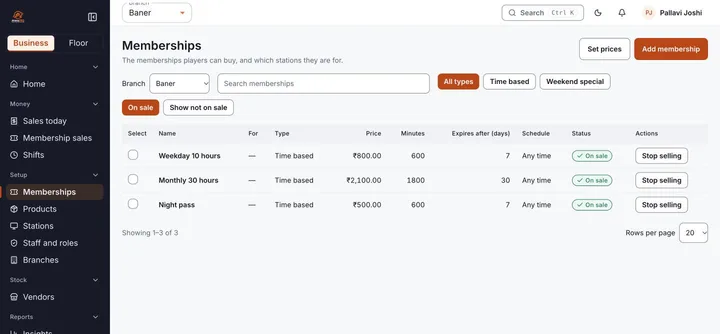
1. Open Setup, then Memberships, and add a membership with its price, minutes and the stations it is for.
The add membership sheet with price, minutes and station class2. At the counter, open Sell, choose Memberships, pick the player and take the payment.
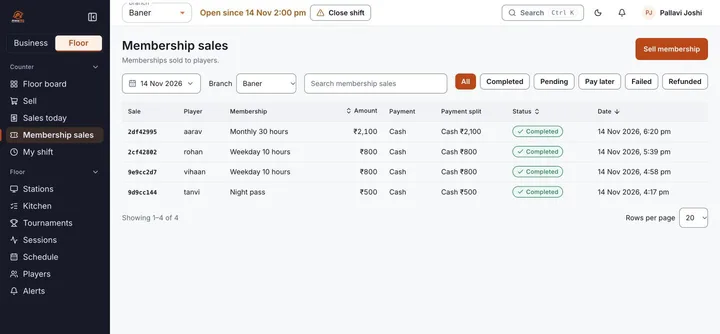
3. The player starts a session on any station the membership is for and the time runs down.
What it runs on
The admin panel at the counter. Players use their time on PCs with the station app, consoles with the TV app or stations run by staff.
Questions
- Can one membership be used on PCs and consoles?
- No. A membership is for one station type and class, so each kind of station is priced on its own. Sell one for each.
- Does unused time expire?
- Each membership has its own validity in days. You set it when you create the membership.
Related features
Try it in your own game zone, free for 14 days.
From ₹499 a month, plus GST
Free for 14 days. A card or UPI is needed to start. Cancel before day 15 and pay nothing.