Close the shift and check the drawer
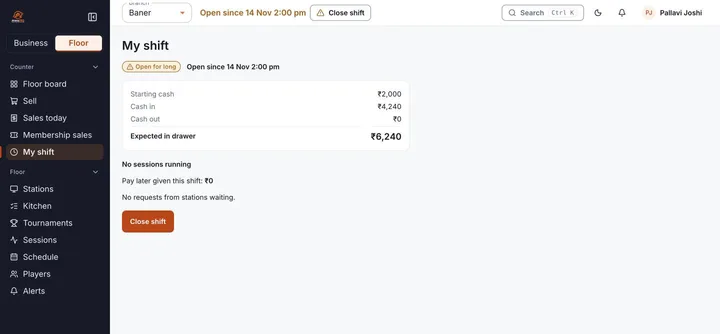
At the end of every shift, count the drawer once. Arena360 tells you whether it matches, is short or is over.
From ₹499 a month, plus GST
Free for 14 days. A card or UPI is needed to start. Cancel before day 15 and pay nothing.
The problem
When two people share a counter, a short drawer is nobody's fault. Without a count at each handover, a small gap every night becomes a habit no one can trace.
How it helps
- Each shift has its own drawer, opened and closed by the person on duty.
- The count is checked against the cash sales of that shift, so a difference is found the same night.
- A difference needs a note before the shift can be closed.
- The Owner sees every difference on the Cash differences page in Reports.
How it works
1. Open Counter, then My shift, and tap Close shift.
2. Tap Count the drawer and enter the notes and coins.
The drawer count with notes and coins entered3. Read the result: Matches, Short or Over. For a difference, write a note.
A shift close result that says Short, with the note field open4. Choose how to finish and tap Finish. The next person opens a new shift.
What it runs on
The admin panel in a browser at the counter. The Owner reads the results from any browser or phone.
Questions
- What if the drawer is short?
- Count again before you finish, then look in Sales today for a cash sale entered twice or not at all. If it is still short, the note explains it and the Owner is told.
- Who sees the differences?
- The Owner and the manager see every difference on the Cash differences page in Reports.
Related features
Try it in your own game zone, free for 14 days.
From ₹499 a month, plus GST
Free for 14 days. A card or UPI is needed to start. Cancel before day 15 and pay nothing.