A PC locks when paid time ends
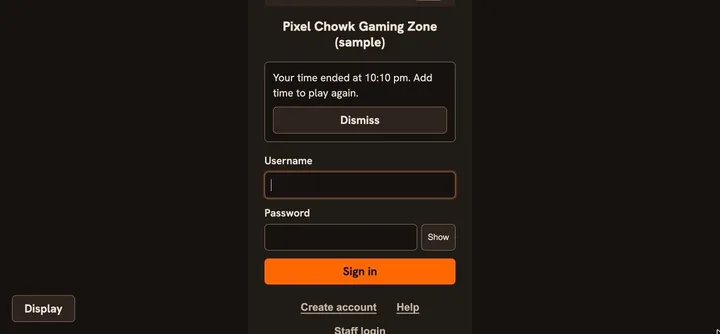
When the paid time ends, the station app locks the PC by itself. Nobody has to watch the clock.
From ₹499 a month, plus GST
Free for 14 days. A card or UPI is needed to start. Cancel before day 15 and pay nothing.
The problem
A player whose hour is up keeps playing while the counter is busy. Ten minutes here and twenty there add up to hours of free play every week, and asking a regular to stop is awkward.
How it helps
- The PC locks at time-up and logs the player out, with no one at the counter needed.
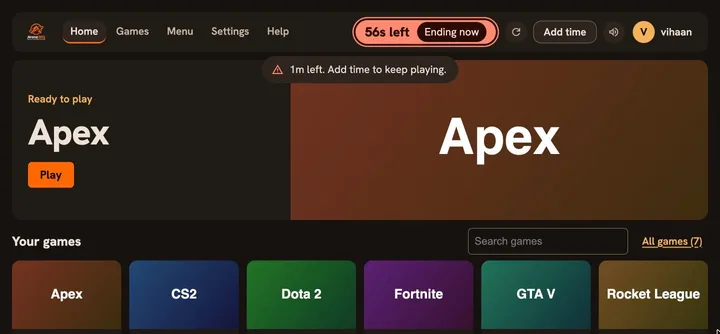
- The player sees the minutes left on screen, so time-up is never a surprise.
- If the app is stopped it starts again by itself; removing it needs a new pairing code.
- Time added from the counter goes on the bill, and the activity log shows who added it.
How it works
1. Install the station app on the PC and pair it with its station.
The station app showing its pairing code on a PC2. Start a session at the counter or let the player sign in with their membership time.
3. The player sees the time left while they play.
4. At time-up the PC locks and shows the lock screen until the next session starts.
What it runs on
Windows PCs with the Arena360 station app installed and paired. Players keep playing through a short internet drop; a PC that cannot reach Arena360 stops play after five minutes.
Questions
- Can a player close the lock app?
- If the app is stopped it starts again by itself. Removing it and installing it again needs a new pairing code from the admin panel.
- What happens when the internet goes down?
- Time keeps counting. A PC that cannot reach Arena360 stops play after five minutes, and Retry now brings it back when the connection returns.
Related features
Try it in your own game zone, free for 14 days.
From ₹499 a month, plus GST
Free for 14 days. A card or UPI is needed to start. Cancel before day 15 and pay nothing.