Food orders from the PC
In Growth and Pro
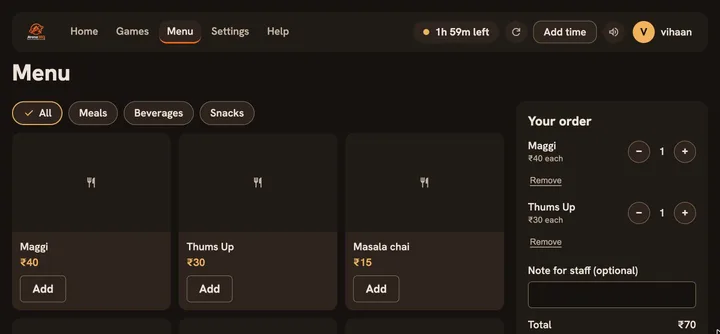
Players order snacks and drinks from the station app. The counter sees the order with the station it came from.
From ₹499 a month, plus GST
Free for 14 days. A card or UPI is needed to start. Cancel before day 15 and pay nothing.
The problem
A player shouts across the floor or leaves the game to order. Orders get missed, and a snack carried over is never rung up.
How it helps
- Orders arrive at the counter with the station name, so staff know where to take them.
- An order becomes a sale, so it is in the shift and the reports like any other.
- The Owner chooses which products can be ordered from a station.
How it works
1. The player opens the order screen on the PC and picks what they want.
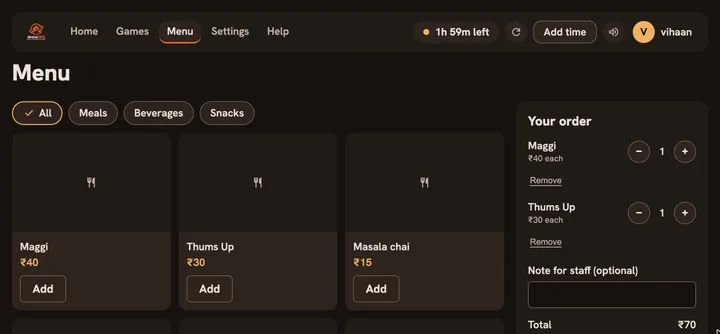
2. The counter sees the order and confirms the payment.
An order from a station waiting at the counter3. Staff take the order to the station.
What it runs on
Windows PCs with the station app, and the admin panel at the counter.
Questions
- Does the player pay at the PC?
- The counter confirms the payment, in cash or UPI, before the order is taken over.
- Can I turn orders off?
- Yes. Station orders is a switch in Setup. Past orders stay.
Related features
Try it in your own game zone, free for 14 days.
From ₹499 a month, plus GST
Free for 14 days. A card or UPI is needed to start. Cancel before day 15 and pay nothing.