Sell snacks and drinks at the counter
One Sell page for snacks, drinks and memberships. Tap the items, take cash or UPI, and the sale lands in the shift.
From ₹499 a month, plus GST
Free for 14 days. A card or UPI is needed to start. Cancel before day 15 and pay nothing.
The problem
A cold drink sold from the fridge goes into the drawer and nowhere else. By the end of the night nobody knows what sold, and a missing drink looks the same as one that was never bought.
How it helps
- Every item has its price set by the Owner, so counter staff cannot change it at the till.
- Cash, UPI and pay later are recorded as they are taken, and each sale belongs to the open shift.
- A product that has run out shows Out of stock on the Sell page.
- Every sale shows up in the shift close and in the sales reports.
How it works
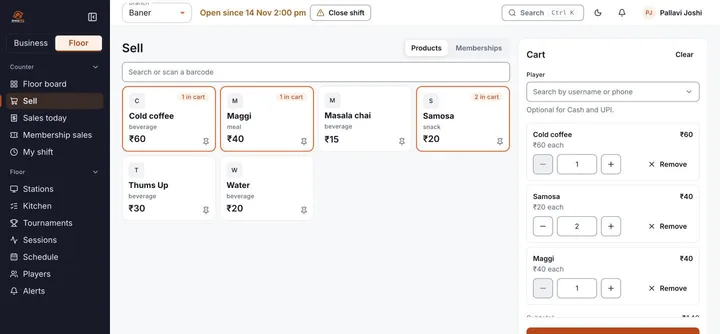
1. Open Counter, then Sell, and tap the products the player wants.
Products added to the cart on the Sell page2. Pick the player when the sale needs one, such as a membership or pay later.
3. Choose how they pay and take the payment. For UPI, enter the last four digits of the reference.
The payment step of a counter sale with cash and UPI to choose from
What it runs on
The admin panel in a browser at the counter. A receipt can be printed from the browser.
Questions
- Can counter staff give a discount?
- No. Counter staff have no discount or change-price action. Prices and memberships are set by the Owner.
- What if the wrong item was sold?
- A manager or the Owner can refund the sale, and the refund is in the activity log.
Related features
Try it in your own game zone, free for 14 days.
From ₹499 a month, plus GST
Free for 14 days. A card or UPI is needed to start. Cancel before day 15 and pay nothing.