Give each person the right access
In every Plan
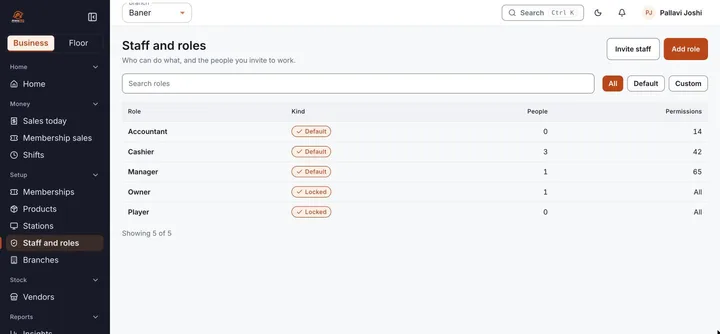
Give each person a role. Counter staff sell and start sessions; the Owner and the manager set prices and see the money.
From ₹499 a month, plus GST
Free for 14 days. A card or UPI is needed to start. Cancel before day 15 and pay nothing.
The problem
When everyone shares one login, anyone can change a price, give a discount or delete a sale, and nobody can tell who did it.
How it helps
- Each person signs in as themselves, so every action has a name.
- Counter staff have no discount or change-price action.
- Invite links expire in 7 days and give only the role you chose.
- The activity log shows who did what.
How it works
1. Open Setup, then Staff and roles, and tap Invite staff.
The invite staff sheet with a role chosen2. Choose the role, create the link and send it to the person.
3. They open the link, set their password and sign in.
What it runs on
The admin panel in any browser. Staff can sign in on the counter computer or their own phone.
Questions
- Can I make my own roles?
- Roles such as Owner, manager and counter staff come ready, each with its own permissions.
- What if someone forgets their password?
- A manager or the Owner can reset a staff password from the admin panel.
Related features
Try it in your own game zone, free for 14 days.
From ₹499 a month, plus GST
Free for 14 days. A card or UPI is needed to start. Cancel before day 15 and pay nothing.