Take bookings for a station
In every Plan
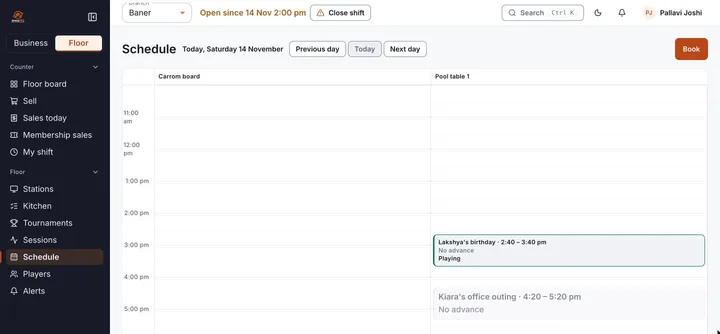
Book a station for a group and a time. The schedule shows the day, and the booking becomes a session when they arrive.
From ₹499 a month, plus GST
Free for 14 days. A card or UPI is needed to start. Cancel before day 15 and pay nothing.
The problem
Bookings taken on WhatsApp clash, get forgotten or turn into no-shows nobody records.
How it helps
- The schedule shows every booking of the day, station by station.
- A booking that clashes with another is refused, with the time it clashes with.
- Start the session from the booking, or mark it no show or cancelled.
How it works
1. Open the schedule and tap a free slot, or New booking.
The new booking sheet with a station, a time and a group name2. Choose the station, the membership, the start time and the group name.
3. When the group arrives, open the booking and tap Start session.
A booking ready to start its session
What it runs on
The admin panel at the counter. Only station types set to be bookable can be booked.
Questions
- What if the group does not turn up?
- Mark the booking no show. It stays in the record.
- Can I book a PC?
- Any station type can be set to be bookable in Setup.
Related features
Try it in your own game zone, free for 14 days.
From ₹499 a month, plus GST
Free for 14 days. A card or UPI is needed to start. Cancel before day 15 and pay nothing.