PS5 cafe billing software for every console hour
Arena360 is PS5 cafe billing software for a counter that runs consoles and PCs together. Each console is billed by the hour, snacks go on the same bill and the TV switches back when the time is up.
Consoles on the same floor with time left
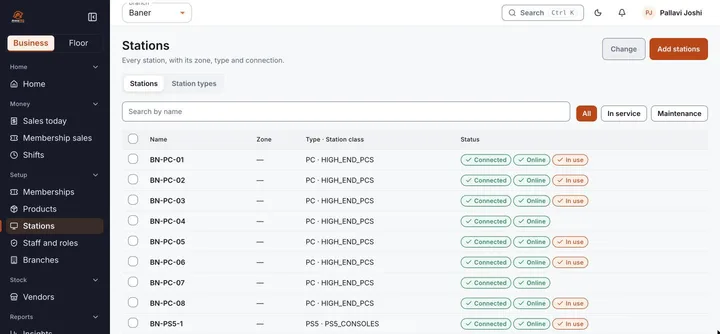
PS5s sit on the same floor board as your PCs, each with its time left, and their sessions reach the same sales reports.
The TV switches back at time-up
The console TV app shows the time left on the TV and switches the HDMI input back when the paid time ends.
Snacks and console time on one bill
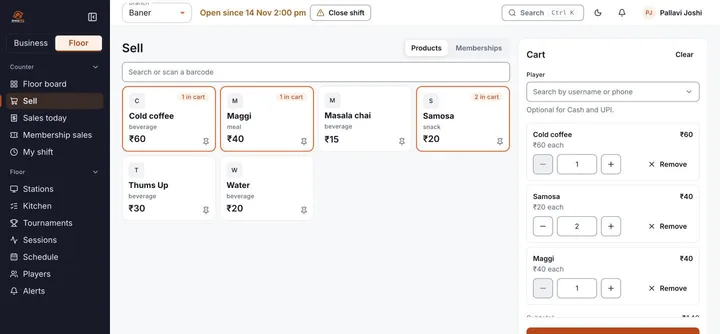
Sell chips, cold drinks and an extra controller with the console hour, and take one payment at the counter.
UPI and a GST invoice
Take cash or UPI for every sale and give the player a GST invoice for the time and the snacks.
Free time for staff, with a limit
Give each person on staff free playing time each period, counted like a membership and never billed.
How a PS5 cafe earns its money
A PS5 bay does not earn like a row of PCs. Four college friends walk in on a Saturday, share one console for two hours of football, and pass the controllers around. One station, four players, and four people at your snack counter. The money is good, but only if every hour is on the bill and the controllers come back on time.
Most console cafes start with a notebook. Someone writes the console number and the start time, and someone else is meant to walk over when the hour ends. On a busy evening that walk does not happen, the group plays on for twenty minutes, and the notebook never matches the drawer. Arena360 replaces the notebook with a console session that is timed, billed and ended the same way every time.
Bill each console by the hour
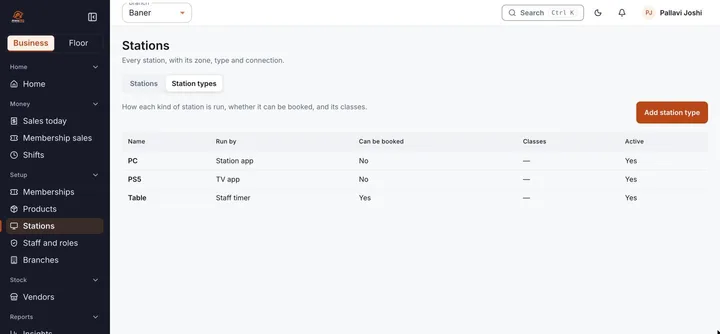
Each PS5 is a station, just like a PC. You give it a station type and a class, set its price, and start a session from its tile on the floor board. The player or the group pays for the time they want, and the tile counts down.
Many zones charge for the console by the hour whether one player or four are holding controllers, and some add a charge for each extra controller. Arena360 handles both:
- Price the console hour by station class, so a PS5 with the big TV can cost more than the one in the corner.
- Add an extra controller as an item on the Sell page, so it goes on the same bill as the console time.
- Sell packs of console hours as a membership made for the PS5 class, so a regular group can play down their hours across the month.
A membership made for a PS5 plays only on a PS5, so a console pack never gets used on a high-end PC.
Group sessions on one console
A multiplayer session is one session on one console. The group shares the time, the tile shows who it belongs to, and when they want another half hour, staff tap the tile and add time. The extra time is billed, and the activity log shows who added it. The Sessions list keeps the start, the end and why each session ended, so when a group says they were cut short, you can show them the minutes.
The TV app ends the session for you
A console has no lock screen of its own. The Arena360 TV app runs on the Android TV the PS5 is plugged into. It shows the time left on the TV while the group plays, and at time-up it switches the HDMI input back, so the game is off the screen. Nobody has to walk over and interrupt a penalty shoot-out.
If a TV cannot switch input, the app says so, and staff end the session from the floor board instead. A console without the TV app can still be run by staff from its tile.
Consoles and PCs on one floor board
PS5s and PCs share one floor board, so the person at the counter sees every station and its time left in one place. Console sessions land in the same shift and the same sales reports as the PCs, so you finally see what the console bay earns next to the PC rows.
Snacks, UPI and the GST invoice
Console groups eat. Samosas, Maggi and cold drinks are sold on the same Sell page as the console time, and the whole bill is paid in one go by cash or UPI. Every payment belongs to the open shift, and the player can get a GST invoice that shows the time and the snacks.
Staff play, within a limit
Staff will play FIFA after closing whatever you say. Staff free time gives each person a set amount of free play that starts again every set number of days. It is used like a membership, shows in the Sessions list and is never billed, so your sales stay true and the free hours are no longer invisible.
Which plan fits your console cafe
Arena360 comes with a 14-day free trial. A card or UPI mandate is needed to start, nothing is charged before day 15, and if you cancel in the trial you pay nothing.
- Starter fits a single console cafe or a small PS5 and PC zone: sessions, memberships, counter sales, shifts, the console TV app and staff free time.
- Growth fits a zone with up to three branches that also wants stock counts for the snack shelf, pay later for regulars and kiosk food orders.
- Pro fits a larger zone that runs console tournaments, busy-hour prices on weekend evenings, a kitchen with KOT and reports for each branch.
The plans
Starter
₹499 a month, plus GST
20 Stations included, 1 Branch
Growth
₹999 a month, plus GST
20 Stations included, 3 Branches
Pro
₹1,999 a month, plus GST
20 Stations included, Unlimited Branches
Next step
From ₹499 a month, plus GST
Free for 14 days. A card or UPI is needed to start. Cancel before day 15 and pay nothing.
From ₹499 a month, plus GST
See pricing