Game zone software for PCs, consoles, VR, tables and snacks
Arena360 is game zone software for a floor that has a bit of everything. PCs, PS5s, a VR corner, snooker tables and a turf all sit on one floor board, the counter bills them with the snacks, and you follow the day from your phone.
Every kind of station on one floor board
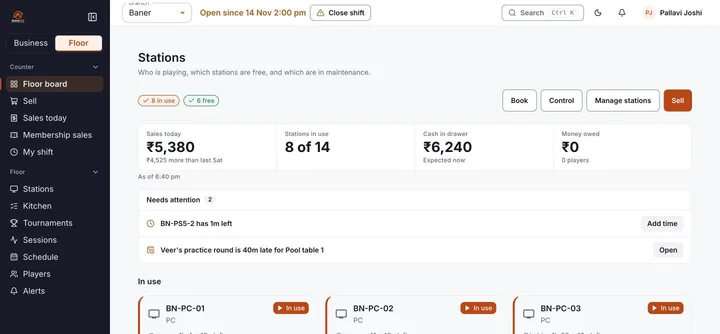
PCs, consoles, VR, tables and turf are all stations, each tile with its player and time, so staff read the whole floor at a glance.
Tables and turf run by a staff timer
A snooker table or turf needs no app or device. Staff start and end it on the board, and every minute is billed.
One counter for play and snacks
Playing time, memberships, snacks and drinks go through one Sell page, in cash or UPI, and land in the open shift.
Book a table or a turf slot
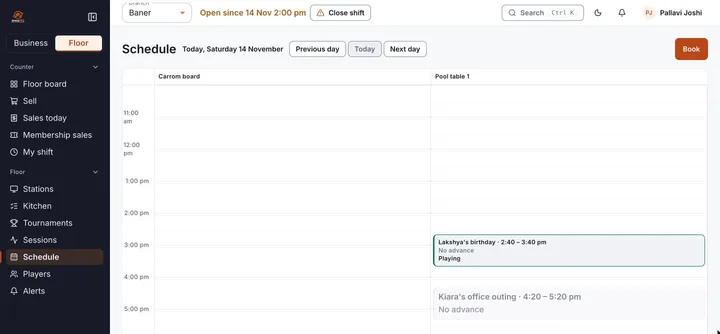
The day schedule shows every booking station by station, refuses a clash and turns into a session when the group arrives.
Stock that counts itself down
Each snack sold comes off the count, each delivery goes on, and stock missing at shift close shows up the same night.
A game zone is more than a row of PCs
Most game zones in India grew one corner at a time. It started with a few PCs, then came the PS5s with big TVs, then a VR headset, a snooker or pool table, maybe a carrom board, and on a good plot a box cricket turf. A fridge of cold drinks and a shelf of chips and Maggi sit next to the counter. Each of these earns money in its own way, and each one is easy to lose track of on a busy Saturday evening.
The usual answer is a mix: one tool for the PCs, a notebook for the tables, a whiteboard for turf slots and a cash box for snacks. At closing time somebody adds it up and hopes it matches. Arena360 puts the whole floor in one place, so the owner reads one set of numbers.
One floor board for every station
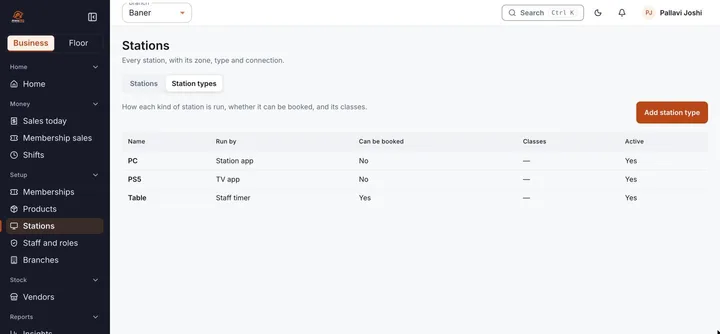
In Arena360 every place a player can pay to play is a station. A PC runs the station app. A PS5 or Xbox can run with the TV app or be run by staff. A VR corner, a snooker table, a pool table or the turf is a station run by a staff timer, with no device needed.
The floor board shows all of them as tiles. Each tile says who is playing and how long they have left, so staff at the counter see which table is free, which console finishes next and which corner has been sitting empty. Add time, pause or end a session from the same tile, and the change goes on the bill.
Because tables and turf are stations too, they are in the same shift and the same sales reports as the PCs. Nobody has to copy the snooker notebook into anything at night.
One counter for play, snacks and memberships
A family walks in: the kids want an hour on the PS5, the father wants a frame of snooker, everyone wants a cold drink. At the counter all of it goes through one Sell page and one payment, in cash or UPI. Every sale belongs to the shift that is open, so the drawer count at closing is checked against exactly what was sold.
Prices are set by the Owner. Counter staff tap items and take payment; they cannot change a price or give a discount at the till. When a product runs out, the Sell page shows Out of stock.
Bookings for tables, turf and groups
Turf and tables are the part of a game zone that people book ahead: an office outing on Friday night, a birthday on Sunday afternoon. The day schedule shows every booking station by station. A booking that clashes with another is refused, with the time it clashes with. When the group arrives, the booking becomes a session in one tap, or staff mark it no show.
The owner’s phone
Most owners are not at the counter all day. The admin app works on a phone, so from home or the other shop you see today’s sales, how many stations are in use and how much cash should be in the drawer. Reports split cash and UPI, so the drawer and the bank can be checked against each other. Each staff member signs in as themselves, and the activity log shows who added time or refunded a sale.
What to look for in game zone software
- Can tables, turf and VR be billed like PCs, or only noted down by hand
- Do snacks and playing time go on one bill and one shift
- Can the owner see the floor and the money from a phone
- Does each staff member have their own login and role
- Are bookings and walk-ins on the same schedule
Try it on your own floor
Arena360 comes with a 14-day free trial. A card or UPI mandate is needed to start, nothing is charged before day 15, and if you cancel in the trial you pay nothing. Data from an unpaid trial is kept for 90 days, or deleted sooner on request.
Which plan fits your game zone
Starter suits a single game zone that wants one floor board, one counter, shifts, memberships and bookings. Growth adds stock count, pay later for regulars, food orders from the PCs, expenses and an alert to your phone when a busy PC has no session, for up to three branches. Pro adds busy-hour prices, a kitchen screen, tournaments, loyalty, deeper analytics and reports for each branch, with no limit on branches.
The plans
Starter
₹499 a month, plus GST
20 Stations included, 1 Branch
Growth
₹999 a month, plus GST
20 Stations included, 3 Branches
Pro
₹1,999 a month, plus GST
20 Stations included, Unlimited Branches
Next step
From ₹499 a month, plus GST
Free for 14 days. A card or UPI is needed to start. Cancel before day 15 and pay nothing.
From ₹499 a month, plus GST
See pricing