Game zone management software made for India
Arena360 is game zone management software for how game zones run in India: UPI at the counter, a GST invoice when asked, rupee prices, an admin panel in Hindi, and branches in other cities on one login.
UPI and GST invoice on every plan
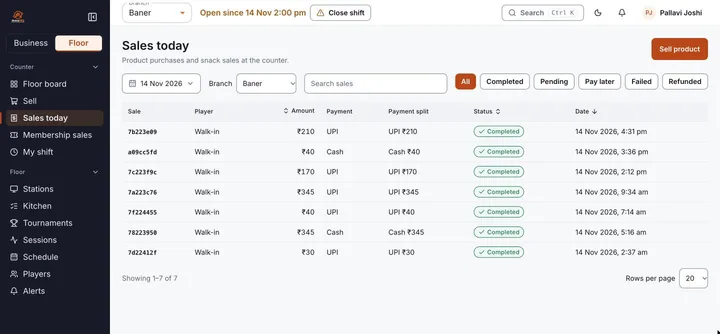
Take cash or UPI at the counter, give a GST invoice when a customer asks, and see cash and UPI split in the reports.
Hindi or English, person by person
Each person switches the admin panel to Hindi or English for themselves, with the same screens and the same numbers.
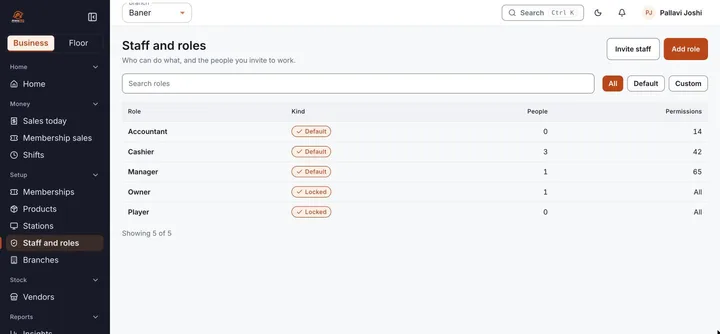
Staff roles with their own logins
Counter staff sell and start sessions; the Owner and the manager set prices and see the money. Every action has a name.
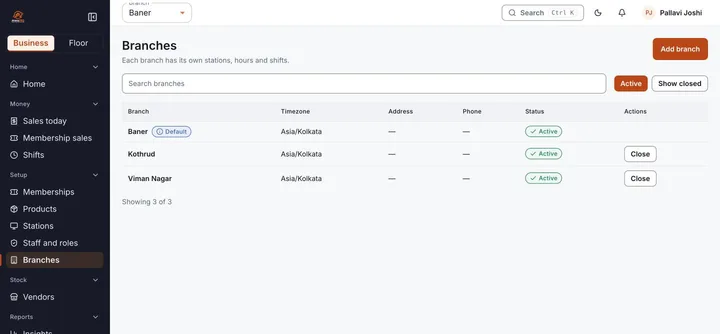
Branches in more than one city
Each branch keeps its own floor, staff, stock and sales. Growth runs up to three branches; Pro has no limit.
Reports for each branch
Read each branch on its own or put them side by side, with the same numbers for every branch so the comparison is fair.
Built around how Indian game zones take money
In most Indian game zones, the payment happens on a phone. A college student scans the QR at the counter, a parent pays by UPI for the kids, an office group splits a turf booking, and a few regulars still hand over cash. Arena360 records cash and UPI as they are taken, and every sale belongs to the open shift. The sales reports split cash and UPI, so the drawer can be checked against the count and the bank against the UPI total.
When a business customer books the turf for a team outing and asks for a GST invoice, the counter can give one. UPI and GST invoice come on every plan, not as an extra.
Prices are set in rupees by the Owner, for each kind of station, each membership and each product. Counter staff cannot change a price or give a discount at the till.
An admin panel your staff can read
Not every counter hand is comfortable with an English screen. In Arena360 each person chooses Hindi or English for themselves. Menus, buttons, messages and receipts follow that choice, while amounts and times stay in the same format, so a report reads the same whether the Owner opens it in English and the manager in Hindi. Changing the language for one person does not change it for anyone else.
Power cuts and internet drops
Every owner in India plans for both. Here is what happens to sessions.
- A short internet drop: the PC stations keep working through it and catch up afterwards. Time keeps counting, so a session that was paid for carries on.
- A longer drop: a PC that cannot reach Arena360 for five minutes stops play. When the connection is back, Retry now on the PC brings it back.
- A power cut: the PCs go off with the lights, but the sessions are kept by Arena360, not on the PCs. From the counter or a phone on mobile data, staff can pause the sessions on the floor board and carry on when the power returns.
An inverter or UPS for the router and the counter keeps the floor board and the counter running through a short cut, which is worth having in any case.
Branches in different cities
Many owners start in one city and open the second shop in another: a branch near a college in Pune, another in a mall in Nagpur. In Arena360 each branch has its own floor board, stations, shifts, stock and expenses. The Owner switches between them with one login and one phone. Staff are given access to one branch or several, and see only those.
Growth runs up to three branches. Pro has no limit and adds reports for each branch, side by side, so you can see which city earns and which one needs attention.
Staff roles and the owner on the phone
Owners of a few branches cannot stand at every counter. Each person signs in as themselves with a role: counter staff sell and start sessions, the manager runs the shift, the Owner sets prices and sees the money. Invite links expire in 7 days and give only the role you chose. At closing, each shift counts its drawer, and a difference needs a note before the shift can close. The Owner reads all of it on the phone, from wherever they are.
Trial terms
The 14-day free trial needs a card or UPI mandate to start. Nothing is charged before day 15, and if you cancel in the trial you pay nothing. Data from an unpaid trial is kept for 90 days, or deleted sooner on request.
Which plan fits
Starter is for one game zone in one city, with UPI, GST invoice, Hindi admin and staff roles from the first day. Growth is for an owner with up to three branches, and adds stock count, pay later for regulars, expenses and the alert when a busy PC has no session. Pro is for a chain across cities: unlimited branches, reports for each branch, busy-hour prices, kitchen and KOT, tournaments, loyalty and analytics.
The plans
Starter
₹499 a month, plus GST
20 Stations included, 1 Branch
Growth
₹999 a month, plus GST
20 Stations included, 3 Branches
Pro
₹1,999 a month, plus GST
20 Stations included, Unlimited Branches
Next step
From ₹499 a month, plus GST
Free for 14 days. A card or UPI is needed to start. Cancel before day 15 and pay nothing.
From ₹499 a month, plus GST
See pricing