Cyber cafe billing software that locks each PC at time-up
Arena360 is cyber cafe billing software for a floor of PCs. The PC locks itself when the paid time ends, memberships run down as players play, and every shift closes with a drawer count.
The PC locks when paid time ends
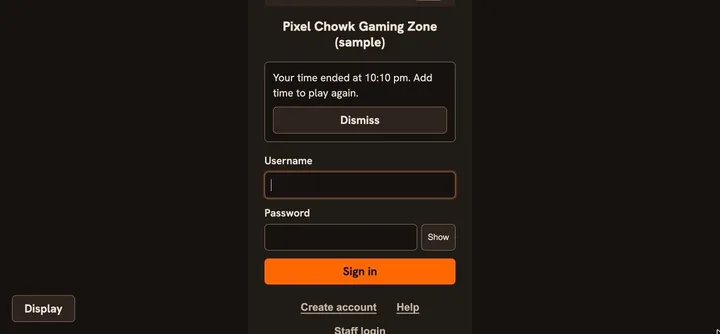
The station app locks the PC by itself at time-up, so nobody plays on for free while the counter is busy.
Memberships and prepaid hours
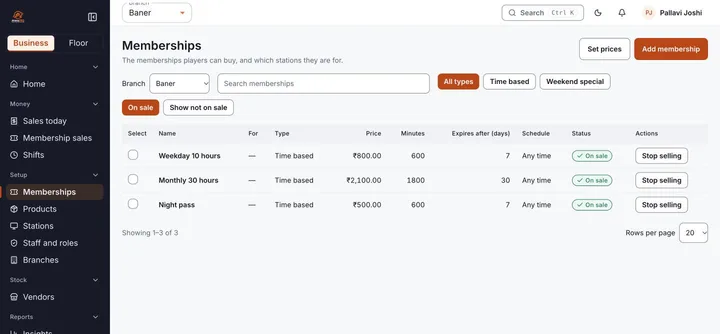
Sell a pack of hours or a monthly pass and let it run down only while the player plays.
Counter sales in the same shift
Snacks, drinks and memberships are sold on one Sell page, and every sale lands in the open shift.
Close the shift and check the drawer
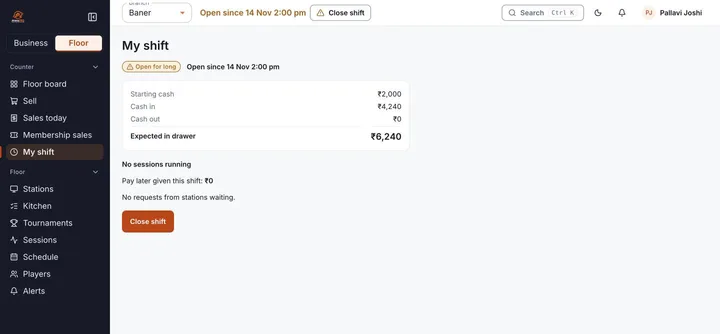
Count the cash at the end of a shift and see whether it matches, is short or is over.
Know when a busy PC has no session
The Owner's phone gets a message when a PC is being played with no session running.
A game library on every PC
Players pick an installed game from one library, and games you hide are blocked.
How a cyber cafe loses money
A cyber or gaming cafe with twenty or forty PCs rarely loses money in one big way. It loses it in small minutes. A player whose hour ended keeps playing while the counter serves a queue. A regular says he has six hours left on his pack when the notebook says four. A cold drink goes into the drawer and nowhere else. The night shift hands over to the morning shift and the drawer is short, and nobody can say why.
Good billing software closes each of those gaps without asking staff to watch the clock. That is what Arena360 is built to do on a PC-heavy floor.
The PC locks itself at time-up
Every PC runs the Arena360 station app, paired with its station. When the paid time ends, the app locks the PC and logs the player out, with no one at the counter needed. The player sees the minutes left on screen while they play, and a warning appears before the end, so time-up is never a surprise.
If someone stops the app, it starts again by itself, and removing it needs a new pairing code from the admin panel. On a short internet drop, players keep playing and time keeps counting. A PC that cannot reach Arena360 stops play after five minutes, so a pulled cable is not a free evening.
Memberships and prepaid hours
Regulars like to pay up front. Sell a pack of ten hours, a monthly pass or a night pass at the counter. The minutes run down only while the player plays, and the player sees their time left on the PC. Each membership is for one station type and class, so a pack for the standard PCs never plays on the high-end row. You set the validity, the days and the hours of use, so a weekday pack stays a weekday pack.
A player with time on a membership can sign in at the PC and start the session there, which keeps the counter free at rush hour.
Counter sales on the same bill
The Sell page holds snacks, drinks and memberships. Tap the items, take cash or UPI, and the sale lands in the shift. Prices are set by the Owner, so counter staff cannot change them at the till, and a product that has run out shows Out of stock. Every sale appears in the shift close and in the sales reports, with a GST invoice when the player needs one.
Shift close and the drawer check
At the end of every shift, the person on duty counts the drawer once. Arena360 checks the count against the cash sales of that shift and says Matches, Short or Over. A difference needs a note before the shift can close, and the Owner sees every difference on the Cash differences page. The next person opens a new shift with their own drawer, so a gap belongs to one handover, not to the whole week.
The idle-PC alert
Sometimes a PC is in use with no session at all: a friend of the staff after hours, or a session ended early while the game carries on. On Growth and Pro, the Owner’s phone gets a message naming the station and the branch. The alert does not stop the game, so a genuine mistake is easy to put right from the floor board.
A game library players can use alone
Players pick a game from one library on the station app instead of asking staff to open it. Games you hide are blocked, games are shown or hidden per station, and Scan again finds a game installed after setup.
Which plan fits your cyber cafe
Arena360 comes with a 14-day free trial. A card or UPI mandate is needed to start, nothing is charged before day 15, and if you cancel in the trial you pay nothing.
- Starter fits a single cafe that needs the time-up lock, memberships, counter sales, shifts and the drawer check.
- Growth fits a cafe with up to three branches that wants the idle-PC alert, stock counts for the snack shelf, kiosk food orders and leak detection.
- Pro fits a large floor that wants busy-hour prices, tournaments, loyalty and leaderboards, analytics dashboards and reports for each branch.
The plans
Starter
₹499 a month, plus GST
20 Stations included, 1 Branch
Growth
₹999 a month, plus GST
20 Stations included, 3 Branches
Pro
₹1,999 a month, plus GST
20 Stations included, Unlimited Branches
Next step
From ₹499 a month, plus GST
Free for 14 days. A card or UPI is needed to start. Cancel before day 15 and pay nothing.
From ₹499 a month, plus GST
See pricing