A console cafe timer that pauses, adds time and ends play
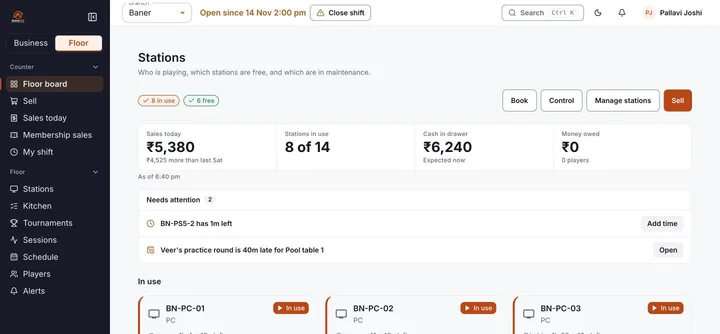
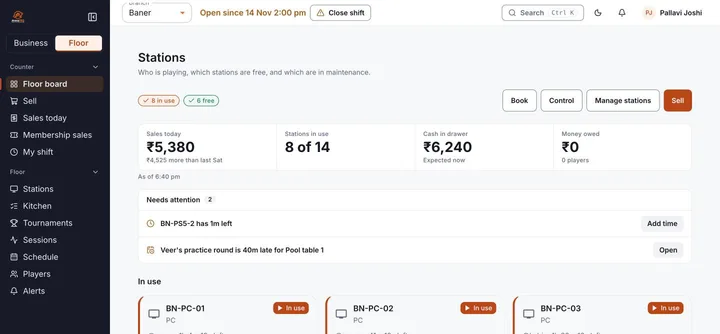
Arena360 gives every console and table its own timer on the floor board. The player sees the time left on the TV, staff pause or add time from the counter, and time-up ends the game without a walk across the floor.
Time left on the TV
The console TV app shows the player the time left on the TV beside the console while they play.
Pause and add time from the tile
Pause a session for a power cut or a break, or add time when the group wants more, from the same tile.
A clear end at time-up
At time-up the TV app switches the HDMI input back, so the game is off the screen and play stops.
Staff timers for snooker and foosball
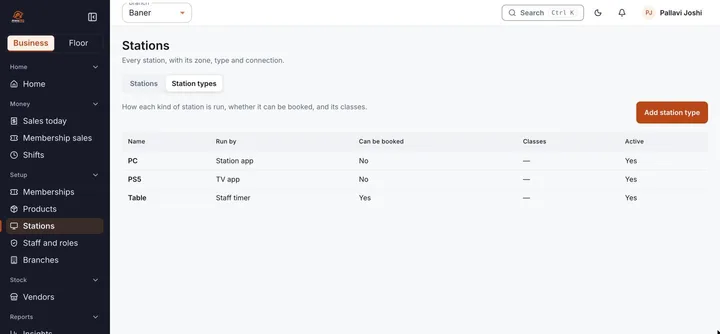
Snooker, pool, foosball and carrom are stations run by a staff timer, with no app and no device on the table.
Why a console needs a proper timer
A PC can lock itself. A console cannot. The usual console cafe timer is a phone stopwatch, a wall clock and a staff member who is meant to remember which group started when. On a quiet afternoon that works. At eight on a Friday, with every sofa full and a queue at the counter, the stopwatch is forgotten and the group plays on.
A good timer does three things. It counts down where everyone can see it, it lets the counter change the time without starting over, and it makes the end of the time clear to the player as well as the staff. Arena360 does all three for consoles and for the tables on the same floor.
One timer per station, on one board
Every console, snooker table and foosball table is a station with its own tile on the floor board. Start a session and the tile counts down the time the player paid for. Staff at the counter see which stations are free, which are running and which are about to finish, without leaving the counter. The Needs attention list on the floor board names a station that is about to run out of time, so nobody is caught out.
Time left on the TV
The Arena360 TV app runs on the Android TV the console is connected to. While the game is on, the player sees the time left on the TV, so the end is never a surprise. A group halfway through a match can see they have ten minutes and decide at the counter whether to buy more, instead of arguing when the screen goes dark.
Pausing a session
Real floors stop for real reasons. The power goes and the inverter only covers the PCs. A player steps out to take a call from home. A controller dies and needs a fresh battery. Staff tap the tile and pause, and the timer stops counting. When play starts again, they tap the tile once more and the countdown carries on from where it stopped. The player pays for minutes played, not minutes lost.
Adding time
When the group wants another half hour, staff tap the tile and choose Add time. The extra time goes on the bill, and the activity log shows who added it. There is no second session to start and no new slip to write, and the Sessions list keeps the whole session in one line with its start, its end and why it ended.
What happens at time-up
With the TV app, time-up is simple: the app switches the TV’s HDMI input back, the game leaves the screen and play stops. Nobody has to walk over and ask a regular to put the controller down.
If the TV does not support HDMI-CEC, the app says CEC unavailable. It still shows the time, and staff switch the input or end the session from the floor board at time-up. A console without the TV app is run by staff from its tile in the same way.
Staff timers for snooker, pool and foosball
Tables have no screen at all. In Setup, add a station type run by a staff timer, such as Snooker, Pool table or Foosball. Its tile shows a stopwatch that staff start and end, and nothing needs to be installed on the table. A staff-run station is never ended for you, so check the board when the time is up. Its sessions sit in the same shift and the same reports as the consoles and PCs, so the snooker table finally has its own line in your sales.
Which plan fits your timers
Arena360 comes with a 14-day free trial. A card or UPI mandate is needed to start, nothing is charged before day 15, and if you cancel in the trial you pay nothing.
- Starter fits a single zone that needs console timers, the TV app, staff timers for tables and bookings.
- Growth fits a zone with up to three branches that also wants stock counts, pay later for regulars and expenses.
- Pro fits a busy zone that wants busy-hour prices, tournaments, loyalty and leaderboards, and reports for each branch.
The plans
Starter
₹499 a month, plus GST
20 Stations included, 1 Branch
Growth
₹999 a month, plus GST
20 Stations included, 3 Branches
Pro
₹1,999 a month, plus GST
20 Stations included, Unlimited Branches
Next step
From ₹499 a month, plus GST
Free for 14 days. A card or UPI is needed to start. Cancel before day 15 and pay nothing.
From ₹499 a month, plus GST
See pricing